
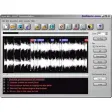
Powerful visual audio editor and converter solution for all current format
AudioEdit Deluxe is a nice, trial version program only available for Windows, being part of the category Audio software with subcategory Editors (more specifically Multiformat).
More about AudioEdit Deluxe
AudioEdit Deluxe is available for users with the operating system Windows 98 and previous versions, and you can download it only in English. Its current version is 4.10 and its last update happened on 12/07/2005.Since the software has been added to our selection of programs and apps in 2005, it has already reached 47,901 downloads, and last week it had 2 downloads.About the download, AudioEdit Deluxe is a software that will require less storage space than most programs in the category Audio software. It's a very popular software in many countries such as Dominican Republic, Brazil, and Singapore.























User reviews about AudioEdit Deluxe
by Anonymous
very useful.
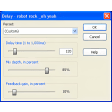
yet it can perform a loads of things for you like adding a great range of effects to audio files like echo, amplification, mixing, reverb, high pass filter, normalization, noise reduction, pitch and speed control and loads of other utilities. More